Most church websites are maintained by one person who did not ask for the job. They know a little HTML, or they knew a little in 2014, and everyone else is grateful enough not to look too closely.
That arrangement works until that person moves away. Then nobody can change the service time. Nonprofits have the same problem with a different job title.
If you are starting from nothing rather than inheriting something, we wrote the step-by-step version separately. This page is about what the finished thing needs to do.
Who your website is actually for
Not your members. Your members already know when you meet and where to park. They find out about the potluck from the announcement, not the site.
Your website is for the person who has never walked in. Someone who moved to town last month, or is looking for a church for the first time in a decade, or is quietly working up the nerve. They are going to visit your website before they visit you, and they are looking for reasons to feel less nervous.
Build for that person and you will serve the members fine along the way.
Answer the anxious questions
Newcomers want to know things they would feel awkward asking.
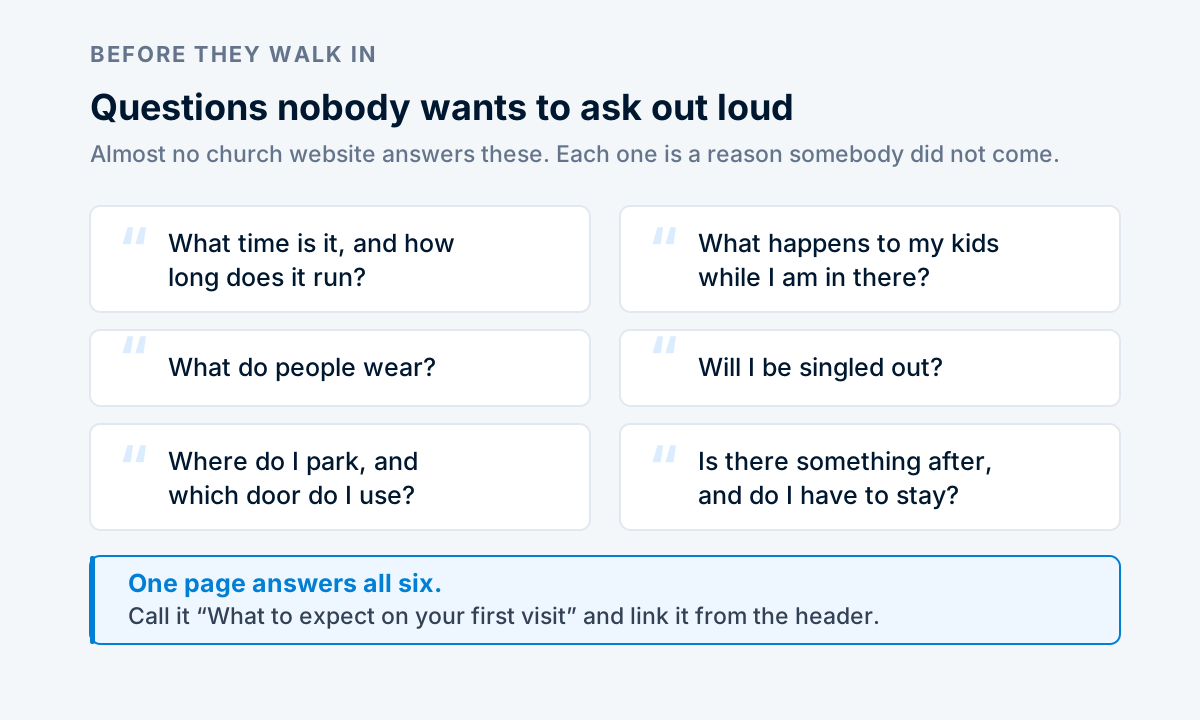
Almost no church website answers these, and every one of them is the reason somebody did not come. A page titled "What to expect on your first visit" that answers all six plainly will do more good than a redesign.
The service time belongs everywhere
Put it on the homepage, in the header, and on the visit page. Put the street address next to it, written out, as text.
Wrong or missing service times are the most common failure on church websites, usually because the time changed for summer and only one of the four places got updated. Keep it in fewer places and keep those current.
Your name, address, service times and phone number go into a business profile once, and the site uses them everywhere they appear. One edit rather than four is the difference between a site that stays right and one that drifts. That consistency is also the second most valuable thing in local search, after the Google profile itself.
Sermons
If you record them, post them, and give each one a real page with a title and a short description of what it covers.
A sermon buried in a video playlist is invisible. A sermon with its own page, a title, and a paragraph of text is something a person can find when they search the topic at eleven at night, which is when people search for these things.
You do not need a media platform for this. A page with an embedded video and a few paragraphs is enough.
Giving
Link to whatever giving platform you already use. Do not try to rebuild it, and do not put it in the navigation ahead of the visit page. Someone deciding whether to attend for the first time does not need the donate button to be the loudest thing on the screen.
Cost, plainly
Nineteen dollars a month, including your domain, hosting, the SSL certificate, and the CDN. No setup fee.
If that is genuinely difficult for your congregation, a free option from one of the big builders is a reasonable choice and nobody will think less of you for it. What matters more than the platform is that somebody can update the service time without calling for help.
Common questions
Can more than one person edit it?
Yes, and you should set it up that way from the start. Single-maintainer sites are how churches end up with a service time from three years ago.
Can we post the bulletin?
Yes, though a page works better than a PDF. A PDF bulletin cannot be read comfortably on a phone and cannot be found by search.
Do we need a members-only area?
Almost certainly not. Most churches that ask for one discover the content in it would have been fine on a public page, and the login becomes one more thing to maintain.
We already have a domain from years ago. Can we keep it?
Yes. Point it at Swiftrics and the address keeps working. If you have an older site elsewhere, the importer can bring its pages across and set up redirects. If you are picking one for the first time, the choice matters less than people think, but it is worth getting right once.
Make it easy for the person working up the nerve
Fourteen day free trial. Your plan isn't charged until it ends.